AI automation for businesses is transforming how organisations manage daily operations, reduce repetitive work, and improve productivity. From automating customer enquiries to streamlining document processing, which helps businesses spend less time on manual tasks and more time focusing on growth, customer satisfaction, and strategic decision-making.
Every business has processes that consume valuable time. Employees answer similar emails, enter information into spreadsheets, prepare reports, and manage routine administrative activities. Although these tasks are necessary, completing them manually can slow down operations and limit productivity.
With AI automation for businesses, organisations can combine artificial intelligence with automated workflows to handle repetitive processes more efficiently. Instead of requiring employees to manage every step manually, businesses can use AI-powered systems to process information, trigger actions, and connect different applications.
For small and medium-sized businesses in particular, AI automation presents an opportunity to improve operational efficiency without unnecessarily increasing administrative workloads.
In this article, we explore five repetitive business tasks you can automate with AI and explain how AI automation for businesses can help your organisation work smarter.
5 Repetitive Business Tasks AI Automation for Businesses Can Handle.
1. Automating Customer Enquiries
Customer communication is essential to business success, but responding to repetitive questions can consume significant staff time. Customers may frequently ask about pricing, service availability, delivery schedules, operating hours, or company policies.
Businesses can simplify customer enquiry management by allowing AI-powered assistants and automated workflows to handle routine interactions.

How AI Automation for Businesses Improves Customer Service
An AI-powered customer service workflow can:
- Answer frequently asked questions using approved company information.
- Collect customer details and identify the purpose of an enquiry.
- Categorise incoming requests by topic or urgency.
- Direct enquiries to the appropriate department.
- Record customer information in a customer relationship management (CRM) system.
- Send acknowledgement messages and trigger follow-up reminders.
For example, imagine someone visiting an IT company’s website to ask about the cost of setting up IT support for their business. Instead of waiting for a staff member to become available, an AI assistant could ask a few questions about the company’s needs, collect their contact details, and send an initial response based on the company’s approved information. It could then forward the enquiry to the sales team, so someone can follow up with the customer personally.
This is where automation becomes useful. The customer receives a quicker response, and the sales team doesn’t have to manually sort through every enquiry before deciding what to do next.
Platforms such as ServiceNow also show how AI can support customer and employee service workflows. For example, its AI-powered virtual agents can help users find answers to common questions and guide them through supported requests. In an IT support environment, this could help an employee find instructions for a routine technical problem without having to wait for a support agent. More complex issues can still be passed to the appropriate team.
This allows employees to spend less time processing routine enquiries and more time handling complex customer needs.
Benefits of AI Automation for Businesses in Customer Support
When implemented properly, AI automation can help organisations improve response times, maintain consistent communication, and reduce the risk of overlooking customer enquiries.
Human oversight remains important for complaints, sensitive customer information, and situations that require negotiation or professional judgment.
2. Streamlining Email Management
Email remains one of the most widely used communication tools in business. However, managing a crowded inbox can interrupt productive work and make it difficult to prioritise important messages.
Employees often spend time reading incoming emails, forwarding requests, preparing responses, and following up on outstanding tasks.
AI automation can help organise email communications and turn incoming messages into structured workflows.
How AI Automation for Businesses Simplifies Email Workflows
AI-powered email automation can help businesses:
- Categorise emails by subject, department, or priority.
- Identify important information within incoming messages.
- Summarise lengthy email conversations.
- Prepare draft responses to routine enquiries.
- Create tasks from customer requests and deadlines.
- Route emails to the appropriate employees.
- Send reminders when follow-up actions are overdue.
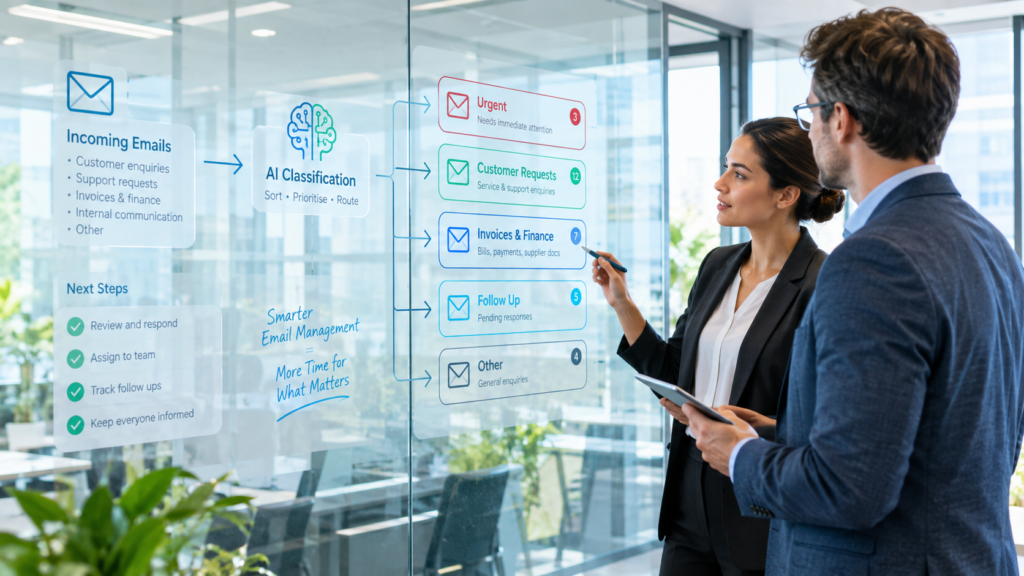
For example, imagine a company receiving dozens of emails every day from customers, suppliers, and staff. A customer might send an email about a delayed order, while a supplier sends an invoice and an employee reports a technical problem. Instead of someone having to go through every message manually, an AI-powered workflow could identify what each email is about, flag urgent requests, and direct them to the right person.
It could also draft a response to a routine enquiry or remind an employee to follow up on a request that has been sitting unanswered. Staff would still be able to review important messages before they are sent, but they would spend less time sorting through their inbox and more time dealing with the issues that need their attention.
Why Businesses Need AI Automation for Email Management
By introducing AI automation, organisations can reduce repetitive administrative work, improve communication workflows, and help employees focus on higher-priority responsibilities.
Businesses should establish appropriate approval procedures for sensitive communications, financial instructions, and messages that could create contractual or commercial commitments.
3. Automating Data Entry and Document Processing
Data entry is another repetitive activity that consumes valuable business resources. Employees often transfer information from invoices, receipts, application forms, purchase orders, and other documents into spreadsheets or business applications.
When this process is performed manually, it can become time-consuming and introduce avoidable errors.
AI tools can streamline document processing by extracting information, organising records, and moving data between connected systems.
How AI Automation for Businesses Handles Documents
Depending on the tools and integrations available, an AI-powered document workflow can:
- Extract information from supported digital documents and scanned forms.
- Identify names, dates, invoice numbers, and other relevant details.
- Classify documents according to their purpose.
- Transfer extracted information into connected business applications.
- Flag missing information and potential duplicate records.
- Send unusual entries for human review.
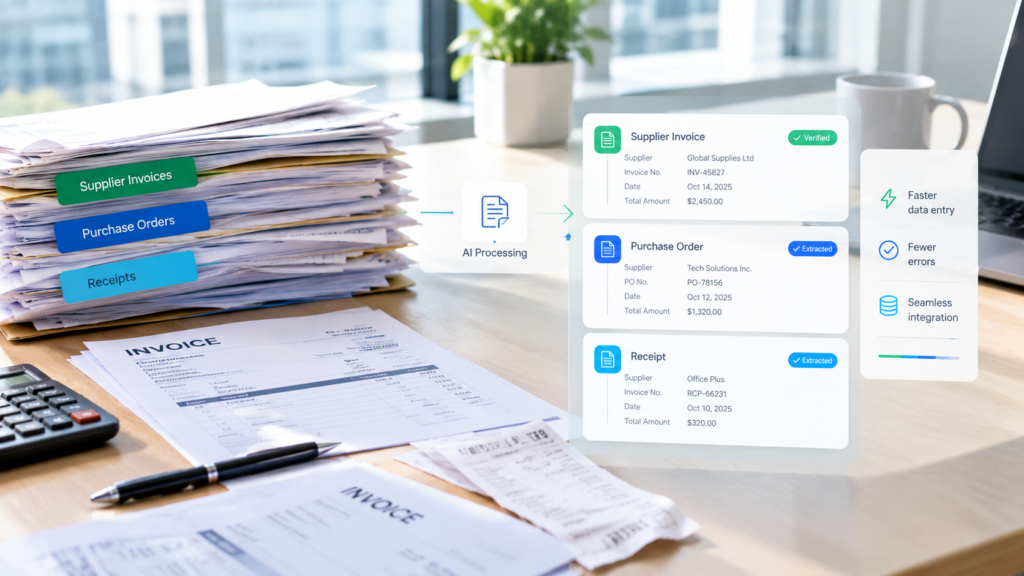
For example, imagine a company receiving dozens of invoices from different suppliers every week. Someone on the finance team would normally have to open each invoice, find the supplier’s name, check the invoice number, record the amount, and enter the details into the company’s accounting system. It might not seem like much work for one invoice, but the time adds up quickly when there are dozens to process.
With AI automation, the system could extract these details from the invoices and enter them into the connected accounting software for review. If an invoice is missing important information or the amount doesn’t match the purchase order, it could flag the issue for an employee to check rather than allowing it to pass through unnoticed.
The finance team would still be responsible for verifying the information and approving payments, but they wouldn’t have to spend as much time entering the same details by hand.
The Business Benefits of AI Automation for Document Processing
AI automation can reduce manual data entry, improve consistency, and make information easier to manage across departments.
However, extracted information should always be checked when accuracy is important, particularly when handling financial records, personal information, or documents that require formal approval. AI can make document processing faster, but human review remains essential for catching errors and making sure important decisions are based on accurate information.
4. Improving Marketing Operations
Marketing teams manage numerous recurring activities, including content planning, copywriting, campaign scheduling, performance monitoring, and reporting. Businesses looking to streamline their marketing workflows can also explore our guide to marketing automation for modern businesses for more ways to improve campaign efficiency, maintain consistency, and reduce repetitive marketing tasks.
When these activities are handled separately, employees may spend more time coordinating workflows than developing effective marketing strategies.
AI automation helps connect marketing activities, simplify repetitive tasks, and support more consistent campaign management.
How AI Automation for Businesses Supports Marketing Teams
AI-powered marketing workflows can help organisations:
- Generate initial content ideas based on audience questions and business objectives.
- Repurpose existing blog articles into draft social media posts.
- Prepare initial email campaign copy and content briefs.
- Organise content calendars and review schedules.
- Collect marketing performance data from supported platforms.
- Generate draft campaign summaries and reports.
- Notify team members when content requires approval.
For example, imagine a business publishes a new blog article on its website. The marketing team could use AI tools to turn the article into a few draft LinkedIn posts, prepare a short summary for its email newsletter, and organise the content for review. Instead of creating everything from scratch, the team has a starting point it can work with.
The team can then edit the drafts, make sure they sound like the brand, check the information, and approve everything before publication. This saves time on repetitive tasks while allowing the team to focus on the ideas and messages that make its marketing more effective.
Why AI Automation for Businesses Matters in Digital Marketing
With AI automation for businesses, marketing teams can reduce repetitive coordination, make better use of existing content, and maintain a more consistent publishing schedule.
AI should support human creativity rather than replace it. Original insights, accurate information, audience understanding, and brand consistency remain essential to effective marketing.
5. Simplifying Reporting and Task Management
Businesses rely on accurate information to track performance, manage projects, and make informed decisions. However, preparing reports, documenting meetings, and following up on outstanding tasks can take up a surprising amount of time.
AI automation for businesses can help reduce this workload by gathering information from connected tools, preparing summaries, and organising routine follow-up activities. Instead of spending hours putting updates together, employees can focus more on reviewing results and deciding what needs to happen next.
How AI Automation for Businesses Improves Reporting
Depending on the software available, AI-powered workflows can:
- Collect information from connected business applications.
- Summarise operational data and highlight notable changes.
- Prepare draft weekly and monthly reports.
- Transcribe and summarise meetings where permitted.
- Identify action items from meeting notes.
- Create tasks in project management software.
- Send reminders about approaching deadlines.
- Prepare project progress summaries for managers.
For example, after a weekly operations meeting, an AI workflow could prepare a summary of the discussion, identify the tasks agreed on, and create draft assignments in a project management system. Team members could then receive notifications about their responsibilities and deadlines once the tasks have been reviewed and confirmed.
In an IT support team, a platform such as ServiceNow can also help streamline ticket documentation and follow-up. Depending on how the system is configured, AI features may assist with summarising incidents, preparing resolution notes, and drafting updates for employees affected by an issue. Routine actions can then follow established workflows, with human approval where necessary.
This helps teams spend less time updating records and chasing information while keeping everyone informed about what needs attention.
The Value of AI Automation for Business Reporting
When implemented properly, AI automation for businesses can reduce administrative work, improve accountability, and make important operational information easier to access.
However, automation does not remove the need for human oversight. Reports should be checked against their source data, and meeting summaries, task assignments, and IT ticket updates should be reviewed for accuracy before they are relied on or shared. This helps businesses benefit from faster workflows without losing control over important details.
How to Implement AI Automation for Businesses Successfully
Understanding the potential of AI automation for businesses is only the first step. Successful implementation requires a clear understanding of existing processes, the right technology, and a practical plan for measuring results.
Businesses should avoid automating processes simply because AI tools are available. Instead, they should identify the specific operational challenges they want to solve.
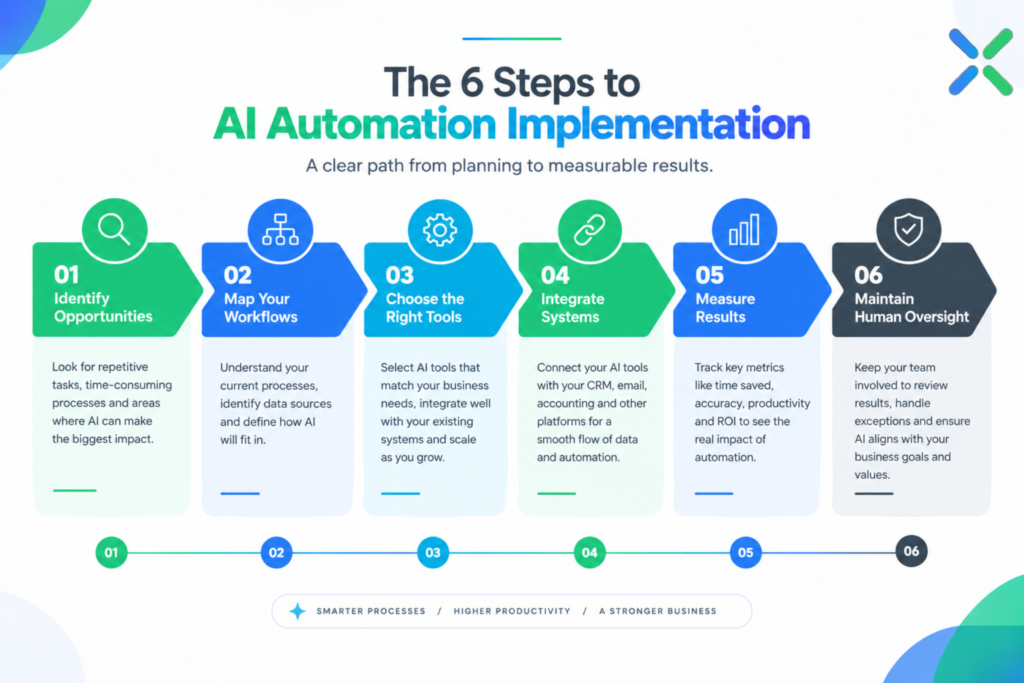
1. Identify Opportunities for AI Automation in Your Business
Start by identifying repetitive tasks that consume staff time, create delays, or require information to be transferred between multiple systems.
Customer enquiry management, document processing, email routing, and routine reporting are useful starting points for exploring AI automation.
2. Map Your Business Workflows Before Automating Them
Document how each process currently works, including the information required, the software involved, the decisions made, and the points where human approval is necessary.
Understanding the existing workflow helps you identify where AI automation can deliver meaningful improvements and where simpler solutions may be sufficient.
3. Choose the Right AI Automation Tools
Not every business task requires artificial intelligence. Some workflows can be handled through simple rules, while others benefit from AI’s ability to interpret language, extract information, or summarise content.
The most effective AI automation for businesses combines the right technology with a clearly defined business process.
4. Integrate AI Automation With Existing Business Systems
Where supported, connect automation workflows to existing email platforms, CRM software, accounting systems, customer support applications, and project management tools.
Integrating AI automation with existing business systems can reduce duplicate data entry and improve the flow of information across departments.
5. Measure the Results of AI Automation for Businesses
Establish a baseline before implementation and monitor the results after introducing automation.
Useful performance indicators include:
- Time spent completing repetitive tasks.
- Customer response and processing times.
- Manual error rates.
- Number of tasks completed successfully.
- Overall workflow costs and efficiency.
Measuring these indicators helps businesses determine whether AI automation is delivering practical value and where further improvements may be needed.
6. Maintain Security and Human Oversight
AI automation should operate within clear rules for data privacy, system permissions, approval procedures, and error handling.
Businesses should protect sensitive information, review important outputs, and establish procedures for escalating tasks that AI cannot handle reliably.
Responsible implementation helps ensure that AI automation for businesses improves productivity without introducing unnecessary operational risks.
The Future of AI Automation for Businesses
AI automation for businesses is about more than completing individual tasks faster. It is about creating connected workflows that help information move smoothly, reduce repetitive manual work, and give employees more time to focus on tasks that require human judgement and expertise.
When implemented properly, AI automation can help businesses improve efficiency, reduce administrative bottlenecks, and make better use of their existing resources.
The opportunities will vary from one business to another. Some may benefit most from automating customer enquiries, while others may see greater value in document processing, marketing workflows, or operational reporting.
The key is to identify genuine business needs, choose the right technology, integrate it with existing systems, and regularly review the results.
Ultimately, successful AI automation for businesses is not about adopting every new tool. It is about finding practical ways to make everyday work easier, help teams work more efficiently, and support long-term business growth.
Explore AI Automation for Businesses With Izutrix
At Izutrix we believe technology should help businesses operate more efficiently, solve everyday challenges, and create opportunities for growth.
Our services include IT Support, Desktop Support, Digital Marketing, and AI Solutions to help businesses make more effective use of technology.
Whether you want to streamline repetitive workflows, improve the movement of information across your organisation, or explore practical applications of AI, the first step is identifying where automation can make a meaningful difference.
With the right approach to AI automation for businesses, your team can spend less time on repetitive work and more time focusing on customers, innovation, and business growth.
Work smarter. Streamline your processes. Discover the possibilities of AI automation for businesses.
Visit www.izutrix.com to learn more and explore solutions for your business.